GMB Messaging Feature
With attention spans dropping and consumer expectations rising, it’s perhaps no wonder that Google My Business (GMB) is rolling out Messaging for desktop users by March 2021. Brand responsiveness will remain in the spotlight with messaging on the web facilitating hassle-free business-consumer communication. So how can you opt-in and make the most of this feature? Let’s find out more.
How Can I Make the Most of Desktop Messaging?
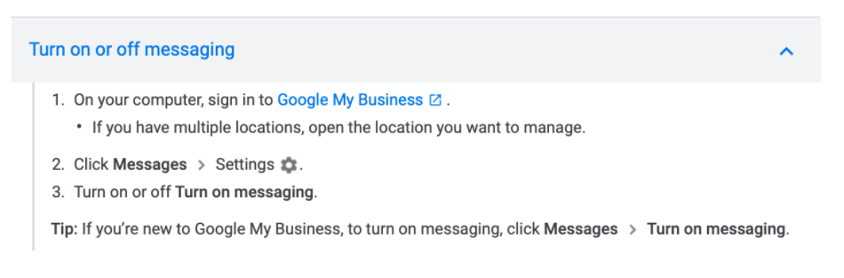
GMB account holders can choose whether or not to opt into the service. But with the messaging functionality being highly publicised, consumers may expect this level of service. Opting in is easy and can be reverted at any time. Simply head to Messages, Settings, and Turn on Messaging. Once that is done, users can send your business a message via your GMB account. These will appear in your GMB desktop dashboard.
What are the Benefits of Google My Business Messaging?
There are many benefits to using the new desktop messaging service. Firstly, desktop messaging helps to eliminate mobile autocorrect errors helping you to deliver an accurate, timely and professional response to consumers. Secondly, desktop messaging creates stronger business relationships and improves the loyalty of your target audience. Queries can be answered directly and promptly helping to reduce social media complaints and bad PR (hopefully).
Furthermore, the new desktop messaging service allows you to automate your initial response to suit your brand voice. This means if you’re not able to tailor a response right away you can still acknowledge that a message has been sent. Anyone who runs your GMB account can then converse with customers easily. But this is an important role. All communication should be professional and on brand.
GMB Messaging – All About the User Experience
As always, when it comes to Google-related products, the user experience is of paramount importance. While tracking conversations and responding to messages is a seamless process, be sure to respond to messages within 24-hours or Google might revoke your access to the tool. It’s also important to note that auto responses don’t count towards your response time, so you’ll need to still formulate a prompt reply.
Being able to access messages on the desktop allows account holders to keep the platform open during the working day and respond to messages as they come in. What’s also good is that you can mark messages as spam so that they don’t impact your response rate.
GMB messaging looks set to improve the overall experience for consumers providing yet another avenue for customers to get hold of a business or brand. While potentially putting another level of pressure on brands, the messaging service can be switched on or off at whim. So when you’re ready to boost real-time communication, you can.
Contact Whitefish Marketing today for all your digital business strategy requirements including SEO articles and web content.